
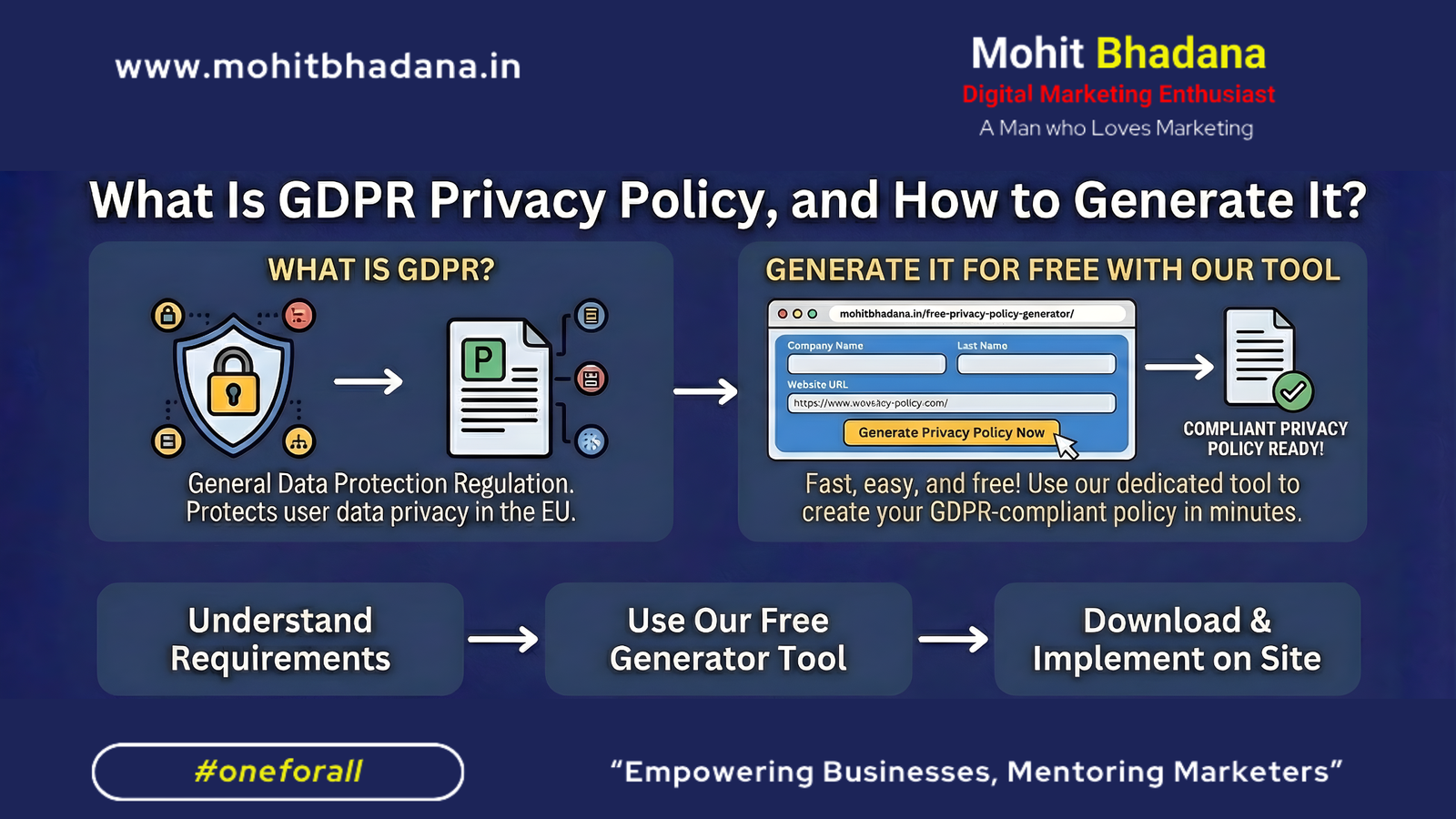
Blog Summary This educational guide explains the meaning of GDPR Privacy Policy, why businesses need it, who it applies to, and the steps to generate a GDPR-compliant policy. You’ll also learn the essential components of a GDPR Privacy Policy and get access to a free online privacy policy generator. What Is GDPR Privacy Policy, and How to Generate It? If you run a website, app, or eCommerce store or collect any user data, you’ve probably heard of GDPR — a privacy regulation designed to protect user data and promote transparency. But what does GDPR Privacy Policy actually mean?Why do websites need it?And most importantly, how can you quickly generate a GDPR-ready privacy policy without legal knowledge? Let’s break it down in a simple and educational manner. What Is GDPR? (General Data Protection Regulation) GDPR is a data protection law created by the European Union (EU) to safeguard users’ personal data. It became effective on May 25, 2018, and applies to: This means even if you are in India, the USA, or any non-EU country, GDPR applies if your website gets EU visitors. What Is a GDPR Privacy Policy? A GDPR Privacy Policy is a legally required document that explains: This policy helps build trust, transparency, and legal protection for your business. Why Is a GDPR Privacy Policy Important? Here are the key reasons: 1. Legal Compliance If you receive EU traffic, a GDPR-compliant privacy policy is mandatory. 2. User Transparency Users should know exactly how their information is handled. 3. Avoid Legal Penalties GDPR violations can result in fines up to €20 million or 4% of global revenue. 4. Trust, Credibility & SEO Search engines favour websites with proper legal pages. What Should a GDPR Privacy Policy Include? To meet GDPR standards, your privacy policy must cover: Data You Collect Examples: Why You Collect It (Purpose) Examples: How You Process and Store Data Explain storage, encryption, and data retention duration. Third-Party Sharing List tools like: User Rights Under GDPR Such as: Cookies & Tracking Technologies Must disclose usage. Contact Information Users should know how to contact the data controller. Creating this manually can be time-consuming — but there’s an easier way. How to Generate a GDPR Privacy Policy Easily You don’t need legal expertise. You just need to provide basic business info. Here’s the easiest way to create one: 👉 Use My Free Privacy Policy Generator Tool I built a simple, fast, and accurate generator for creators, marketers, and business owners: 🔗 https://mohitbhadana.in/free-privacy-policy-generator/ Just enter your: And the tool generates a GDPR-friendly Privacy Policy instantly. Perfect for:✔ Websites✔ Blogs✔ Apps✔ SaaS tools✔ Shopify/WordPress stores Educational Example: GDPR in Real Life Imagine you run a digital marketing blog and collect emails for newsletters. According to GDPR, you must clearly explain: A GDPR Privacy Policy ensures all this is documented properly. Benefits of Using a GDPR-Ready Privacy Policy Tips for Maintaining GDPR Compliance ✔ Use SSL (HTTPS)✔ Add a cookie consent banner✔ Avoid collecting unnecessary data✔ Allow users to delete data✔ Update your privacy policy when needed Conclusion A GDPR Privacy Policy is more than a legal requirement — it is a commitment to transparency and responsible data handling. Whether you’re a creator, marketer, or business owner, having a proper policy protects both your users and your brand. And instead of writing one from scratch… 👉 Use this tool to generate a GDPR-compliant privacy policy instantly: 🔗 https://mohitbhadana.in/free-privacy-policy-generator/ Easy. Fast. Free. FAQs 1. What is a GDPR Privacy Policy? A GDPR Privacy Policy is a legal document that explains how your website collects, uses, stores, and protects the personal data of EU users. 2. Who needs GDPR compliance? Any business that processes data of EU residents, even if the business is outside the EU. 3. How do I generate a GDPR Privacy Policy? Use an online generator like this one:🔗 Free Privacy Policy Generator https://mohitbhadana.in/free-privacy-policy-generator/ 4. What data is covered under GDPR? Any information that identifies a person: emails, IP addresses, names, device IDs, etc. 5. Is a privacy policy required for Google Ads or Facebook Ads? Yes! Both platforms require an accessible privacy policy page. 6. Is using a generator enough for GDPR compliance? A generator helps create the required legal text, but you must also follow GDPR practices (cookie consent, data protection, etc.) Mohit BhadanaDigital Marketing Strategist , Consultant & Trainer mohitbhadana.in
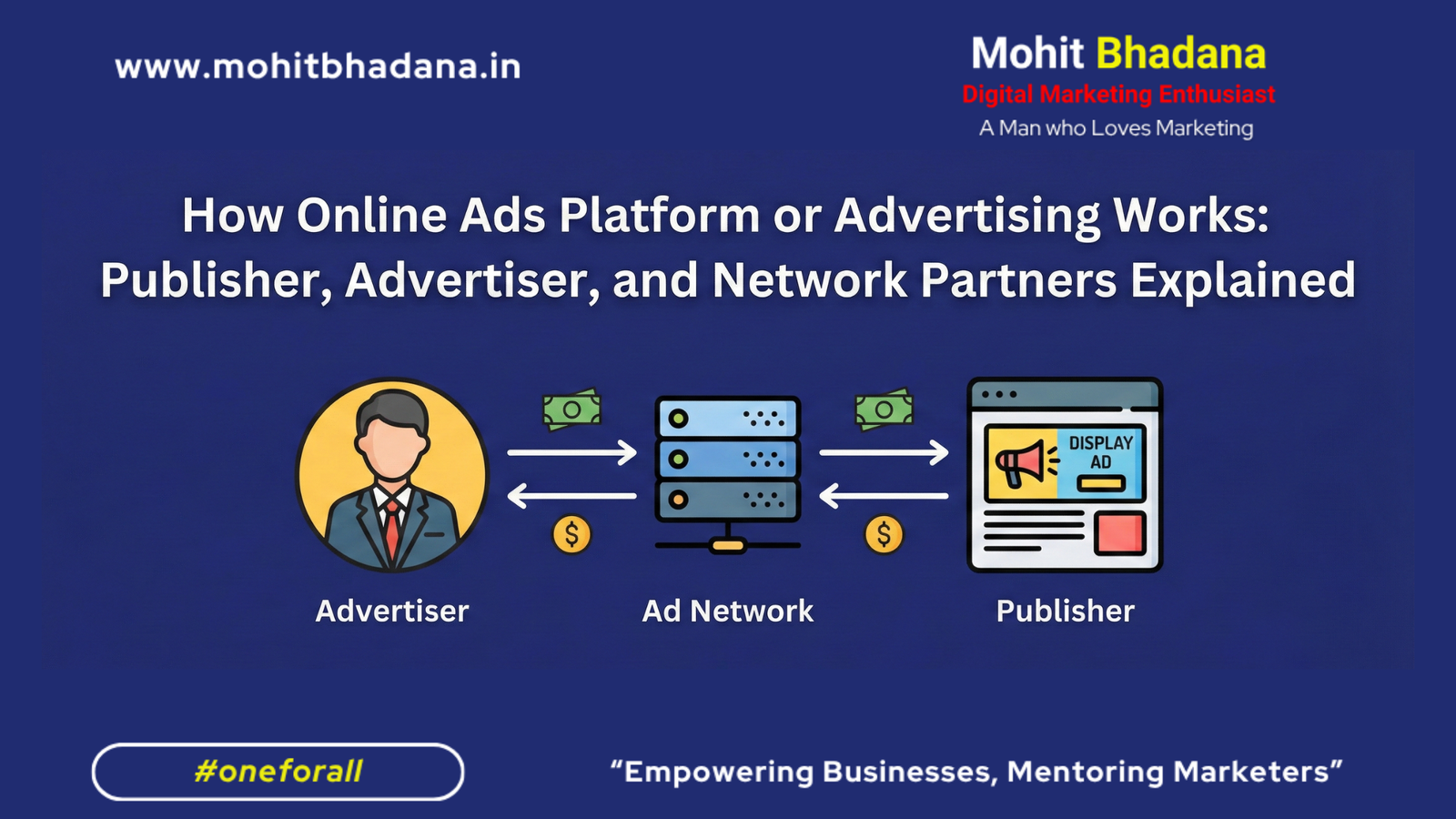
How Online Ads Platform or Advertising Works: Publisher, Advertiser, and Network Partners Explained
Blog summary This article explains how online advertising platforms work by breaking down the roles of advertisers, publishers, and network partners. It covers how ads are created, matched, and delivered to users through ad networks, the step-by-step ad delivery process, and how platforms like Google AdSense monetize websites such as MohitBhadana.in. A practical guide for marketers, students, and business owners who want to understand the digital advertising ecosystem clearly. To understand how online ad platforms or advertising works, we must first explore how these entities interact to deliver targeted ads to users in real time. 1. Who Is the Advertiser? The advertiser is the business, brand, or agency that wants to promote a product or service. They spend money to buy ad placements across digital properties. Examples of advertisers: The advertiser defines: Goal of the advertiser: Get conversions, leads, app downloads, or brand awareness. 2. Who Is the Publisher? The publisher is the owner of a digital property (website, app, or platform) where ads are shown. Publishers earn revenue by allowing ads to appear on their website. A real example of a publisher: mohitbhadana.in runs Google AdSense and displays banner ads across its pages. When users browse the blog or tools pages, ads appear and generate revenue for the publisher based on impressions or clicks. Publishers monetize their traffic using: Goal of the publisher: Maximize their earnings by increasing traffic and engagement on the site. 3. Role of Network Partners (Ad Networks & Ad Exchanges) Ad networks and ad exchanges sit between advertisers and publishers. Their job is to match the advertiser’s audience requirements with the publisher’s available ad space. Popular ad networks: How network partners work: Goal of the ad network: Ensure both publishers and advertisers achieve optimal results. 4. How the Online Ads Platform Works (Step-by-Step Process) Why This Model Works Effectively Entity Major Benefit Advertiser Gets targeted audience and measurable results Publisher Earns revenue by monetizing traffic Network Partner Makes a commission on each transaction Real Case Summary This complete ecosystem ensures win-win outcomes for all three parties. FAQs 1. What is the difference between an advertiser and a publisher? The advertiser pays to run ads for marketing purposes, while the publisher earns money by displaying ads on their website or app. 2. Can a website be both advertiser and publisher? Yes. A website can advertise its products on other platforms and also display paid ads to earn income. 3. How do publishers get paid? Publishers are paid through CPC (Cost Per Click), CPM (Cost Per Thousand Impressions), or CPA, depending on the ad network and campaign type. 4. Do publishers need high traffic to earn from AdSense? Higher traffic results in higher earnings, but even niche blogs with moderate traffic can earn well if their audience is relevant. 5. Is online advertising cost-effective for businesses? Yes. Unlike traditional ads, online advertising offers precise targeting, measurable results, and better ROI. Mohit BhadanaDigital Marketing Strategist , Consultant & Trainer mohitbhadana.in

What Is the Keyword Match Type in Google Ads? (Educational Guide)
Blog Summary This educational guide explains the concept of Keyword Match Type in Google Ads, including Exact Match, Phrase Match, and Broad Match. You’ll learn how each match type works, how it impacts ad performance, and how to choose the right one. Includes examples using [ ], ” ” and broad formats — plus a link to a free tool that instantly generates all three match types. What Is the Keyword Match Type in Google Ads? When you run Google Ads, selecting good keywords is only half the job. To ensure your ads appear for the right searches, you need to understand Keyword Match Type, a setting that controls how close a user’s search query must be to your keyword before Google shows your ad. Think of match types as classroom filters: These filters in Google Ads are called: Let’s explore each one in a clear, student-friendly way. 1. Exact Match – The Most Controlled Match Type Notation: [keyword] Exact Match tells Google to show your ad only when the search query matches the meaning of your keyword very closely. Example: Keyword: [best running shoes] Your ad will show for queries like: But it won’t show for: When Should You Use Exact Match? 2. Phrase Match – Balanced & Intent-Focused Notation: “keyword” Phrase Match allows your ad to show when a user’s search includes the meaning of your keyword, with additional words before or after. Example: Keyword: “digital marketing course” Your ad may show for: But NOT for: When Should You Use Phrase Match? 3. Broad Match – The Widest, Intent-Based Match Type Notation: keyword (no symbols) Broad Match gives Google the freedom to show your ads to related searches, synonyms, variations, and intent-based keywords. Example: Keyword: car insurance Google may show your ad for: When Should You Use Broad Match? Comparison Table — Which Match Type Should You Choose? Match Type Reach Control Relevance CPC Best For Exact [ ] Low High Very High Low–Medium High-intent leads Phrase “ ” Medium Medium High Medium General targeting Broad High Low Medium High (if unmanaged) Discovery & scaling How to Choose the Right Keyword Match Type (Educational Strategy) For beginners: Start with Phrase Match → It offers the safest balance. For lead generation: Use Exact Match + Phrase Match. For large-scale growth: Use Broad Match + smart bidding + strong negatives. For research: Use Broad Match to discover new keywords via the Search Terms Report. Use the Google keyword planner tool to do the keyword research. Want to Generate All Match Types Instantly? Manually adding [ ], ” “, and broad formats for dozens of keywords can be time-consuming.So I built an easy, one-click tool: 👉 Free Keyword Match Type Tool for Google Ads https://mohitbhadana.in/free-keyword-match-type-tools-for-google-ads/ Just paste your keyword → Get Exact, Phrase, and Broad instantly. This tool is perfect for:✔️ Digital marketers✔️ PPC specialists✔️ Students learning Google Ads✔️ Agencies managing large accounts Real-Life Examples to Make It Even Clearer Example Keyword: digital marketing course Match Type Example Input Search Queries Triggered Exact Match [digital marketing course] digital marketing course Phrase Match “digital marketing course” best digital marketing course, online digital marketing course Broad Match digital marketing course marketing course online, learn digital skills Pro Tip: Always Use Negative Keywords Negative keywords prevent irrelevant clicks. Example:Keyword: “digital marketing course”Negative keyword: free This blocks searches like: Result: better leads, less wastage. Conclusion Understanding Keyword Match Types in Google Ads is essential for building smarter, more cost-efficient campaigns. By mastering Exact Match, Phrase Match, and Broad Match, you’ll:✔️ Spend your budget wisely✔️ reach the right audience✔️ improve conversions✔️ reduce irrelevant clicks And to make your workflow smoother, don’t forget to use:👉 Free Keyword Match Type Generator https://mohitbhadana.in/free-keyword-match-type-tools-for-google-ads/ FAQs 1. What is a keyword match type in Google Ads? It’s a setting that determines how closely a user’s search must match your keyword for your ad to appear. 2. What is Exact Match? Exact Match [keyword] triggers ads only when the search closely matches the keyword’s meaning. 3. What is Phrase Match? Phrase Match “keyword” shows ads when the search includes the meaning of your keyword with extra words before or after. 4. What is Broad Match? Broad Match triggers ads for related terms, synonyms, and intent-based searches. 5. Which match type is best for beginners? Phrase Match — because it’s balanced and safer. 6. Do I need negative keywords? Yes! Negative keywords prevent irrelevant traffic and save budget. Want to Learn more about Google Ads? Check the Google Ads mindmap on My Digital Marketing Notes Mohit BhadanaDigital Marketing Strategist , Consultant & Trainer mohitbhadana.in

What Is Schema Markup in SEO & How to Generate It? (101 Guide)
Blog Summary This educational guide explains schema markup, how it helps search engines understand your content, and how to generate schema markup for websites. It covers different schema types, real examples, SEO benefits, and provides an easy link to generate schema via a free tool. What Is Schema Markup in SEO & How to Generate It? (101 Guide) If you want better rankings, rich snippets, and higher click-through rates, then Schema Markup is one of the most important things you can add to your website. Yet many beginners and even experienced marketers avoid schema because it feels “technical.” This guide breaks it down in a simple, educational way — and by the end, you’ll know what schema markup is, why it matters, and how to generate it in minutes using a free tool. What Is Schema Markup? (Simple Definition) Schema markup is a form of structured data added to a webpage that helps search engines understand your content more clearly. Think of a schema as a label for your content. Search engines like Google can read your webpage, but schema tells Google: By providing this extra context, search engines display better and more detailed search results known as rich snippets. Why Is Schema Markup Important for SEO? Schema markup helps your SEO in multiple ways: 1. Rich Snippets Adds extra information (ratings, prices, FAQs, product details). 2. Better CTR (Click-Through Rates) More detailed results attract more clicks. 3. Clear Understanding for Search Engines Google understands your content better → better indexing & ranking. 4. Voice Search Optimization Google Assistant, Siri, and Alexa rely heavily on structured data. 5. Essential for Local SEO Business hours, reviews, address, service area — all shown via schema. Schema isn’t optional anymore — it’s a must-have SEO element. Types of Schema Markup You Should Know Schema markup follows a globally recognized vocabulary maintained by Schema.org. If you want to learn the complete schema structure and JSON-LD types in detail, check the official resource here: Schema.org Official Structured Data Standard Here are the most common types used in SEO: 1. Article Schema For blogs, news, and educational content. 2. Product Schema For eCommerce product pages. 3. FAQ Schema For frequently asked questions blocks. 4. Local Business Schema For small businesses (salons, restaurants, stores). 5. Review Schema Adds ratings in SERPs. 6. Event Schema For webinars, concerts, and launches. 7. Person / Organization Schema For personal branding or company pages. 8. Breadcrumb Schema Shows path navigation in search results. Manually writing JSON-LD code for these is technical… So here’s the easiest way. How to Generate Schema Markup (Easiest Method) You don’t need coding skills.You don’t need SEO expertise.You just need a simple tool. Use My Free Schema Markup Generator Tool I created a free and easy tool that generates a schema for any webpage: Free schema markup generator by Mohit bhadana Just choose your schema type → fill in the fields → copy the JSON-LD code → paste into your site. Perfect for: ✔ Bloggers✔ SEO beginners✔ Agencies✔ WordPress websites✔ eCommerce stores Example: Schema Markup in Action Imagine you run a blog and publish an article titled: “10 Best Places to Travel in India” Without schema, Google only sees text.With schema, you can tell Google: { “@type”: “Article”, “headline”: “10 Best Places to Travel in India”, “author”: “Your Name”, “datePublished”: “2025-01-01” } This helps Google: ✔ Understand your article✔ Display it better✔ Increase click-through rates This is exactly why schema matters! Where Should You Add Schema Code? Depending on your platform: WordPress Paste the JSON-LD into a Header/Footer script plugin or inside the page HTML, or you can use the Header Footer code manager plugin. Shopify Add to theme.liquid or individual product templates. Custom Website Insert inside <script type=”application/ld+json”>. No Coding Skills? Use page builders like Elementor → HTML widget. Benefits of Using Schema Markup If you want your website to look professional and authoritative in Google results, schema is essential. Generate Your Schema Markup in Seconds Instead of spending hours writing code, use this free tool: Free Schema Markup Generator Fast. Easy. Beginner-friendly. FAQs (Schema Markup) 1. What is Schema Markup in SEO? Schema markup is structured data that helps search engines understand your webpage clearly and show rich results. 2. How can I generate schema markup easily? You can use this free online tool to generate JSON-LD schema in minutes:🔗 https://mohitbhadana.in/free-schema-generator/ 3. Do I need coding knowledge for schema markup? No. Schema tools automatically create the code for you. 4. Does schema improve SEO rankings? Schema itself doesn’t guarantee rankings but significantly improves visibility, CTR, and content clarity — which boosts SEO results. 5. Is schema markup required for every webpage? Not mandatory, but highly recommended for: 6. How do I test if my schema markup works? Use Google’s Rich Results Test to validate your code. Mohit BhadanaDigital Marketing Strategist , Consultant & Trainer mohitbhadana.in
Why Hostinger Is the Best Web Hosting for Digital Marketers
Blog Summary Choosing the right hosting is crucial for every digital marketer. A slow, unreliable website can ruin campaigns and SEO rankings. This blog explains why Hostinger stands out as the best web hosting for digital marketers, covering speed, uptime, SEO features, and pricing that help you scale your online presence with confidence Why Hostinger Is the Best Web Hosting for Digital Marketers Digital marketers live and breathe performance. Whether you’re running ads, building funnels, optimizing SEO, or scaling eCommerce campaigns, your hosting provider can make or break your success. If your website loads slowly, crashes during traffic spikes, or limits integrations, you lose visitors, conversions, and trust. That’s where Hostinger shines. It’s not just a hosting company — it’s a performance partner built for modern marketers. 1. Blazing Speed & High Performance Page speed is more than just a technical metric — it’s a marketing necessity. Fast websites mean better user experience, higher ad Quality Scores, and improved SEO rankings. Hostinger’s infrastructure runs on LiteSpeed servers and NVMe SSD storage, giving websites up to 3x faster loading times than traditional hosting providers. Why It Matters for Digital Marketers: Example: Running a Google Ads campaign? Hostinger ensures your landing pages load in under 2 seconds — boosting conversions and ad ROI. 2. Reliable Uptime & Security Downtime is a marketer’s nightmare. Imagine launching a Facebook campaign, and your website goes offline mid-conversion — lost clicks, wasted ad budget, and frustrated users. Hostinger guarantees 99.9% uptime and uses advanced security layers, including Cloudflare CDN, DDoS protection, and automated daily backups. Marketer Benefit: 3. Built-In Marketing & SEO Tools One of the biggest advantages of Hostinger is that it’s built with marketers in mind. Their dashboard includes: Why It’s a Game-Changer: Instead of juggling tools, you get an all-in-one marketing foundation — ready for blogging, funnel building, and analytics. 4. Scalability That Grows With You Every marketer starts small — but campaigns grow fast. Hostinger’s flexible plans make scaling easy. From shared hosting to cloud and VPS hosting, you can upgrade without migrating your website or losing data. Ideal For: Pro Tip: Start with Hostinger Business Web Hosting, then upgrade to Cloud Hosting as your traffic grows. 5. Affordable Pricing With Premium Features Hostinger offers one of the best price-to-performance ratios in the market. While many hosts charge extra for SSLs, daily backups, or CDN, Hostinger includes them for free in most plans. Example Pricing Snapshot: Marketer Takeaway: You get enterprise-grade speed and security without paying enterprise prices — a huge plus for agencies or freelancers managing tight budgets. 6. Global Reach for International Campaigns If you’re running ads or SEO campaigns targeting audiences outside India, Hostinger’s global data centres ensure fast loading times everywhere. With servers in the US, UK, India, Singapore, and Europe, you can host websites near your target audience — improving ad performance and user experience. Example: An Indian agency running campaigns in Dubai or the US can choose a nearby server region for minimal latency. 7. Exceptional Customer Support for Marketers When deadlines are tight and campaigns go live, you can’t wait 24 hours for a support ticket. Hostinger’s 24/7 live chat support is fast, knowledgeable, and perfect for marketers managing client projects. Real-World Scenario: Need to fix an SSL issue or migrate a website before a campaign launch? Hostinger’s team resolves most issues in under 10 minutes — saving hours of stress. Why Hostinger Stands Out Among Other Hosting Providers Feature Hostinger Competitor Average Speed LiteSpeed + NVMe SSD Standard SSD Uptime 99.9% 99.5% SSL & CDN Free Paid Add-ons AI Website Builder Included Rare Support 24/7 Live Chat Email-Only Pricing ₹69/mo ₹199+/mo In short, Hostinger offers premium-level performance at a fraction of the cost. Who Should Choose Hostinger? Hostinger is perfect for:✅ Digital marketers running ad campaigns and funnels✅ SEO experts managing multiple client websites✅ Bloggers and content creators who need fast load times✅ Small businesses and agencies scaling online It’s built for marketers who care about speed, reliability, and conversions. FAQs 1. Why is Hostinger the best web hosting for digital marketers? Hostinger combines speed, uptime, affordability, and SEO tools, making it ideal for campaign-driven websites that demand performance. 2. What makes Hostinger different from other web hosting providers? Unlike most hosts, Hostinger uses LiteSpeed technology, AI-powered tools, and global servers, offering faster and more reliable service for a lower cost. 3. Is Hostinger good for SEO? Yes! Hostinger’s fast servers, CDN, and free SSL help improve Core Web Vitals, which directly impacts SEO and organic rankings. 4. Can I host multiple websites on Hostinger? Absolutely. With the Premium or Business Plan, you can host multiple domains under one account — perfect for agencies or freelancers. 5. How secure is Hostinger? Hostinger provides Cloudflare protection, daily backups, and SSL encryption, ensuring your website and customer data remain secure. Want to learn more about web hosting and domains? Read these blogs Learn the basics of building your online identity in my guide on what a domain name is Understand the fundamentals of hosting with this quick guide on what web hosting is and its best types. Mohit BhadanaDigital Marketing Strategist , Consultant & Trainer mohitbhadana.in
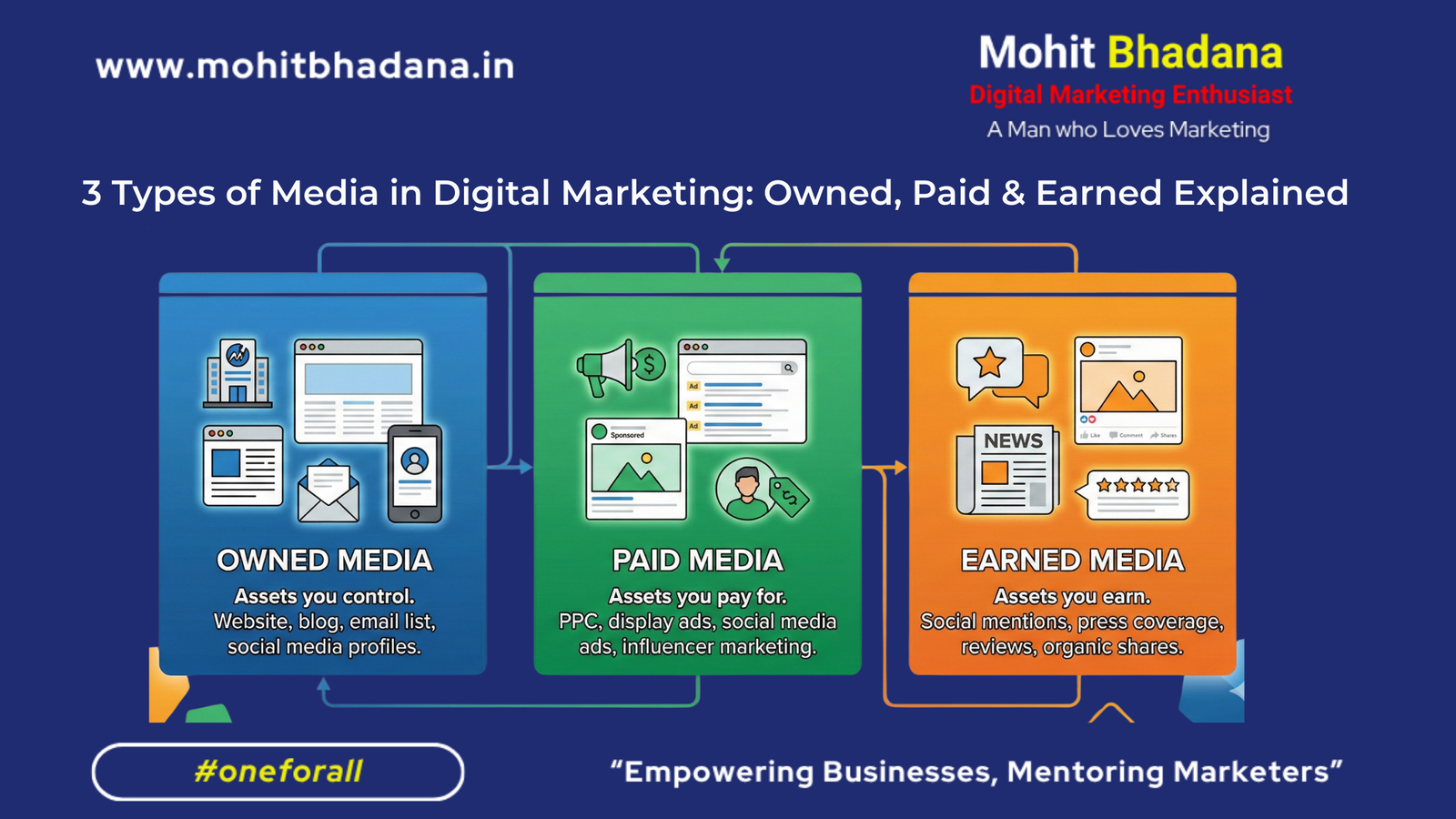
3 Types of Media in Digital Marketing: Owned, Paid & Earned Explained
Blog Summary In digital marketing, every successful brand uses a mix of Owned, Paid, and Earned Media to build visibility, trust, and conversions. This blog breaks down what each type means, its unique advantages, and how you can integrate them into your marketing strategy for maximum impact. 3 Types of Media in Digital Marketing: Owned, Paid & Earned In today’s digital landscape, businesses have countless ways to reach their audience. But every marketing effort — from social media posts to ads and PR mentions — fits into one of three categories of media: – Owned Media – Paid Media – Earned Media Understanding how these work (and how to balance them) is key to building a strong, sustainable digital presence. 1. Owned Media — Your Digital Assets Definition: Owned media refers to all the online properties your brand owns and controls — where you can share content freely and maintain your brand identity. Examples: Your website, blog, email newsletters, mobile app, and social media handles. 💡 Real-World Example: Zomato Zomato’s owned media is a masterclass in brand communication.Their official app and website not only allow users to order food but also showcase restaurant ratings, delivery insights, and user reviews — all carefully structured for SEO and engagement.Zomato also uses its Instagram and LinkedIn pages as extensions of its voice — mixing humor, trends, and food culture that reflect its unique personality. Takeaway: Zomato owns its communication platforms and uses them consistently to build a relatable, high-engagement community. 2. Paid Media — Your Amplifier Definition: Paid media includes every form of paid promotion you use to attract new audiences and drive quick conversions. Examples: Google Ads, Meta Ads, influencer sponsorships, YouTube ads, and display advertising. 💡 Real-World Example: Zepto Zepto’s launch campaign, “10-Minute Delivery,” became the talk of the town thanks to strategic paid advertising.They invested heavily in: Takeaway: Zepto used Paid Media to create mass awareness fast, then leveraged Owned and Earned Media to sustain it. 3. Earned Media — The Power of Reputation Definition: Earned media is unpaid exposure gained when others talk about your brand — reviews, shares, news mentions, or viral content. Examples: Press coverage, organic influencer mentions, social shares, and UGC (user-generated content). 💡 Real-World Example: boAt boAt earned massive visibility through organic influencer advocacy and social media buzz.Fans proudly call themselves “boAtheads” and share their experience online — not because they’re paid to, but because they love the product.This earned exposure also extends to celebrity shoutouts and press features, which boosted the brand’s trust factor without massive ad spends. Takeaway: boAt’s earned media success comes from authentic brand love and community building — turning customers into promoters. How They Combine All Three (Integration Example) Let’s connect the dots 👇 Similarly, boAt relies on community-driven Earned Media while reinforcing its brand with Owned content and Paid influencer partnerships. How Owned, Paid, and Earned Media Work Together The magic happens when all three media types work in sync. Media Type Control Cost Objective Owned Full Low Build trust & educate audience Paid Partial Medium/High Drive traffic & conversions Earned None Free (indirect) Build credibility & awareness Example of Integration: You publish a blog on your website (owned). You run Facebook Ads to promote it (paid). People share it and mention your brand online (earned).→ That’s the perfect digital marketing loop. Best Practices for Balancing the 3 Media Types When done right, the trio creates a sustainable growth system — one that scales reach, engagement, and brand authority together. FAQs 1. What are the 3 types of media in digital marketing? The three main types are Owned Media, Paid Media, and Earned Media. Owned is what you control, Paid is what you promote, and Earned is what others say about you. 2. Why is it important to balance owned, paid, and earned media? Balancing all three helps build trust (earned), increase reach (paid), and maintain authority (owned). Relying on only one type limits your brand’s growth. 3. What is an example of earned media? An influencer mentioning your product or a happy customer sharing your post without being paid — that’s earned media. 4. Which media type gives the fastest results? Paid media gives instant visibility and traffic, while owned and earned media build long-term value. 5. How do I measure the effectiveness of each media type? Use analytics: learn more about Online consumer behaviour in today’s Digital era – read now Mohit BhadanaDigital Marketing Strategist , Consultant & Trainer mohitbhadana.in

Top Free Digital Marketing Courses Online with Certification in 2025
Blog Summary Title: Top Free Digital Marketing Courses Online with Certification in 2025Summary: This blog highlights 25+ free digital marketing courses covering SEO, content marketing, social media, analytics, and AI marketing. All courses offer certifications from industry leaders like Google, SEMrush, HubSpot, and LinkedIn. A perfect guide for beginners and professionals looking to upskill. Top Free Digital Marketing Courses Online with Certification in 2025 Looking to upgrade your digital marketing skills without spending a dime? Whether you’re a beginner or a working professional, there’s never been a better time to learn. The internet is packed with high-quality free digital marketing courses online with certification, helping marketers stay relevant, strategic, and job-ready. In this guide, we’ll list the top free courses you can take in 2025 to boost your career in SEO, content marketing, social media, AI marketing, and more—plus, they all come with certifications! Why Learn Digital Marketing in 2025? Best Free Digital Marketing Courses Online with Certification 📘 1. Google – Fundamentals of Digital Marketing Course: Fundamentals of Digital Marketing Provider: Google Digital GarageFocus: SEO, SEM, Analytics, Display AdsCertification: Yes (by Google) 🧠 2. SEMrush Academy – SEO Toolkit Course Course: SEO Toolkit Focus: Using SEMrush tools for SEO success 🔍 3. SEMrush – SEO Fundamentals Course Course: SEO Fundamentals Instructor: Greg Gifford 🔧 4. SEMrush – On-Page & Technical SEO Course: On-Page and Technical SEO ⚙️ 5. SEMrush – Technical SEO Course Course: Technical SEO Instructor: Bastian Grimm 🔗 6. SEMrush – Link Building Course Course: Link Building Course 📊 7. Google Analytics Academy Course: Google Analytics Focus: Advanced website traffic tracking and analysis 📱 8. HubSpot – Social Media Marketing Course: Social Media Marketing Focus: Social strategy, campaign planning, and engagement 📸 9. HubSpot – Instagram Marketing Course Course: Instagram Training 📘 10. HubSpot – Facebook Marketing Course Course: Facebook Marketing 🐦 11. HubSpot – Twitter Strategy Course: Twitter Training 💼 12. HubSpot – LinkedIn for Business Course: LinkedIn Marketing 👂 13. SEMrush – Building a Social Listening Program Course: Social Listening Program 📝 14. SEMrush – Role of Content in Marketing Course: Role of Content 📚 15. SEMrush – Content Marketing Fundamentals Course: Content Fundamentals 🧰 16. SEMrush – Content Toolkit Course Course: Content Toolkit 🔎 17. SEMrush – Keyword Research Course Course: Keyword Research 📈 18. SEMrush – Content-Led SEO Course Course: Content-Led SEO Instructor: Brian Dean 📰 19. SEMrush – Mastering Digital PR Course: Digital PR 🔗 20. SEMrush – Backlink Management Course: Backlink Management Bonus Free Courses for Specialized Learning 🤖 AI for All – India Government Initiative Course: AI for All 💬 WhatsApp Marketing Academy by Wati Course: Wati WhatsApp Course 💡 Meta Blueprint (Facebook) Course Hub: Meta Blueprint 📣 Google Ads Certifications Skillshop: Google Ads Courses 🧠 OpenAI Academy – AI Essentials Course: OpenAI Academy 🧾 Generative AI for Marketing – LinkedIn Learning Course: LinkedIn Learning Path 🎥 Instagram Creator Course Course: Born on Instagram 📌 Looking to apply what you learn in real time? After completing these free digital marketing courses, take the next step by getting personalized guidance and hands-on support. Book 1:1 Digital Marketing Mentorship & Consulting Sessions with Mohit Bhadana to accelerate your growth. Whether you’re a beginner or a working professional, you’ll receive tailored strategies to boost your campaigns, optimize performance, and scale your brand online. FAQs Q1. Are these digital marketing courses really free? Yes, all listed courses are free to access and offer certification after completion. Q2. Do I need prior experience to start? No! Many of these courses are beginner-friendly, while others are suitable for professionals looking to upskill. Q3. Will I receive a certificate after completing the course? Yes, each course includes a certificate of completion from the respective platform. Q4. Can these certifications help me get a job? While not a substitute for formal degrees, these certifications strengthen your resume and show real-world skills to employers.Q5. How much time does each course take? Most courses range from 2 hours to 10 hours. You can learn at your own pace. Mohit BhadanaDigital Marketing Strategist , Consultant & Trainer mohitbhadana.in

What are DA and PA, and How Do You Check These SEO Metrics?
What are DA and PA? A Complete Guide to Domain & Page Authority Ever feel like your website’s content is great, but it’s still not ranking well on Google? The issue might be your website’s Domain Authority (DA) and Page Authority (PA). These SEO metrics help you understand how strong your website and individual pages are in the eyes of search engines. In this guide, we will break down what DA and PA are, how they work, and how you can check them to improve your SEO performance. What is Domain Authority (DA)? Understanding Domain Authority Domain Authority (DA) is a score that predicts how well a website will rank on search engine results pages (SERPs). Developed by Moz, the DA score ranges from 0 to 100. A higher DA score indicates a better chance of ranking well in search results. Factors Influencing Domain Authority Real-World Example: Imagine you run a popular blog about Indian recipes. If other high-authority food blogs and websites link to your content, your DA will improve, making your website more likely to rank for keywords like “best biryani recipes.” What is Page Authority (PA)? Understanding Page Authority Page Authority (PA) measures the ranking strength of a specific page, rather than the entire website. Also developed by Moz, it uses a similar scale from 0 to 100. Higher PA scores mean better chances of ranking high for specific keywords. Factors Influencing Page Authority Real-World Example: Suppose you have an article titled “What is Marketing? Understanding the 7Ps and 4Cs of Marketing.” If it receives backlinks from other marketing websites, its PA will increase, making it more likely to rank high for related search terms. How to Check DA and PA? Using Moz Tools Moz provides powerful tools to check both DA and PA: Using Third-Party Tools Other tools provide similar metrics: These tools may have different names for DA and PA but offer similar insights. Simply enter your website URL, and you’ll receive scores along with backlinks and keyword performance data. DA vs. PA: What’s the Difference? Factor Domain Authority (DA) Page Authority (PA) Scope Entire domain Individual pages Main Focus Overall website strength Specific page strength Influenced By Backlinks, domain age, site structure On-page SEO, content quality, backlinks Best For Measuring overall site health Targeting specific keywords or topics Which Metric Should You Focus On? How to Improve Your DA and PA Improving Domain Authority Improving Page Authority Conclusion Understanding Domain Authority (DA) and Page Authority (PA) is essential for improving your website’s SEO performance. Monitoring these metrics helps you identify strengths and weaknesses, guiding you to create a better-optimized website. Start by checking your DA and PA with tools like Moz or Ahrefs and work on enhancing them using the tips provided. FAQs 1. What is Domain Authority (DA)? DA is a metric that predicts how well a website will rank on search engines, measured on a scale of 0 to 100 by Moz. 2. What is Page Authority (PA)? PA measures the ranking strength of an individual page on a website, using a similar 0 to 100 scale. 3. How can I check my website’s DA and PA? Use tools like Moz Link Explorer, MozBar, Ahrefs, and Semrush to check your website’s DA and PA. 4. How can I improve my DA and PA? Focus on building high-quality backlinks, optimizing on-page SEO, enhancing user experience, and producing valuable content. 5. What’s the difference between DA and PA? DA measures overall domain strength, while PA measures the strength of individual pages. Mohit BhadanaDigital Marketing Strategist , Consultant & Trainer mohitbhadana.in
What Are Search Engines and How Do They Work?
Blog Summary: This blog explains how search engines function, covering the four-step process: Crawling, Indexing, Retrieval, and Ranking. Learn key ranking factors, types of search engine results, and how to optimize your website for better visibility Introduction Search engines have become an integral part of our daily lives, helping us find information, products, and services within seconds. Whether you’re searching for the latest news, a local restaurant, or a tutorial, search engines like Google, Bing, and Yahoo provide the most relevant results. But have you ever wondered how search engines work? In this article, we will break down the key components of search engines, how they function, and the factors that influence search rankings. What Is a Search Engine? A search engine is an online tool or website that helps users find information by displaying relevant web pages based on their search queries. The most popular search engines include: Each search engine uses complex algorithms to analyze and rank billions of web pages in milliseconds, providing users with the most relevant results. How Do Search Engines Work? Search engines follow a four-step process to index and rank web pages: 1. Crawling Search engines use automated bots called crawlers or spiders to scan the internet and discover new or updated content. These bots move from one page to another through links, gathering data about websites. Key Aspects of Crawling: 2. Indexing Once a search engine crawls a website, it stores and organizes the collected data in a massive database called an index. This index helps the search engine retrieve relevant results when a user performs a search. Key Aspects of Indexing: 3. Retrieval When a user submits a search query, the search engine fetches the most relevant data from its index. This process ensures that users receive the best possible results for their searches. Key Aspects of Retrieval: 4. Ranking After retrieving relevant pages, the search engine ranks them based on relevance and authority. The ranking is determined by a complex algorithm that considers hundreds of ranking factors. Key Ranking Factors: ✅ Keywords – How well the page matches the search query.✅ Backlinks – Links from other trusted websites improve authority.✅ User Experience (UX) – Fast loading speed, mobile-friendliness, and easy navigation.✅ Content Quality – Original, valuable, and engaging content ranks higher.✅ Domain Authority – Websites with high credibility and trust rank better.✅ Page Structure – Optimized headings, meta descriptions, and schema markup help improve ranking. Types of Search Engine Results Search engines display results in multiple formats: 1. Organic Search Results These are non-paid listings ranked based on relevance and SEO (Search Engine Optimization). Websites that follow SEO best practices rank higher in organic search results. 2. Paid Search Results (PPC Ads) Businesses pay for Google Ads or Bing Ads to display at the top of search results for specific keywords. These are marked as “Sponsored” or “Ad.” 3. Featured Snippets A featured snippet is a highlighted search result that appears at the top of Google. It provides a direct answer to a query, often in bullet points, tables, or paragraphs. 4. Local Search Results (Google My Business) Google displays local businesses in a map pack based on proximity, relevance, and reviews. For example, searching “restaurants near me” shows nearby listings with reviews and directions. 5. Video and Image Search Google and Bing rank videos and images separately in their video and image search sections. Platforms like YouTube also rank video content using their own algorithms. Conclusion Search engines have revolutionized how we access information, making it easier to find relevant content within seconds. They work through a four-step process: Crawling, Indexing, Retrieval, and Ranking, using complex algorithms to provide the best results. For website owners and businesses, understanding SEO and optimizing content can improve search rankings, increase traffic, and grow online visibility. By following SEO best practices, anyone can enhance their online presence and reach their target audience effectively. To learn more about SEO strategy check SEO Notes by Mohit Bhadana FAQs 1. What is the main function of a search engine? A search engine helps users find relevant information online by crawling, indexing, retrieving, and ranking web pages based on search queries. 2. How does Google decide which websites rank higher? Google ranks websites based on relevance, content quality, backlinks, user experience, and hundreds of algorithmic factors to ensure the best results. 3. What is the difference between organic and paid search results? Organic results appear naturally based on SEO, while paid search results (PPC ads) are sponsored listings that businesses pay for. 4. How often do search engines update their algorithms? Major search engines like Google frequently update their algorithms, with core updates happening multiple times a year to improve search accuracy and user experience. 5. How can I optimize my website for better ranking? You can optimize your website using SEO best practices, including keyword research, high-quality content, backlinks, mobile-friendliness, and fast loading speeds. 6. What is local SEO, and how does it work? Local SEO helps businesses rank in location-based searches by optimizing Google My Business profiles, customer reviews, and local keywords. Mohit BhadanaDigital Marketing Strategist , Consultant & Trainer mohitbhadana.in
Exploring Digital Marketing Opportunities in India: Jobs, Freelance, Business & Personal Branding
Blog Summary This guide explores digital marketing opportunities, including careers, freelancing, business growth, and personal branding. Learn how to start a career in digital marketing and leverage it for success. Digital Marketing Opportunities in India The digital marketing industry in India is growing rapidly, creating numerous opportunities for professionals, freelancers, business owners, and personal brands. With businesses shifting online, the demand for skilled digital marketers continues to rise. Whether you’re looking for a job, a freelance career, business growth, or personal brand development, digital marketing offers diverse pathways to success. In this blog, we will explore different digital marketing opportunities, including career options, freelancing, entrepreneurship, and personal branding, along with a brief guide on how to start a career in digital marketing in India. 1. Digital Marketing Jobs in India: Career Paths & Opportunities Why Choose a Digital Marketing Job? Popular Digital Marketing Job Roles: ✅ SEO Specialist – Optimizes websites to rank higher on search engines.✅ Content Marketer – Creates blogs, videos, and social media content to engage audiences.✅ Social Media Manager – Handles social media strategies, content creation, and audience growth.✅ PPC Specialist – Manages paid ad campaigns on Google Ads, Facebook Ads, etc.✅ Email Marketing Specialist – Develops email campaigns for customer engagement.✅ Digital Marketing Manager – Oversees marketing campaigns and team operations. Career Growth & Salary Expectations Entry-level salaries in India start from ₹3–6 LPA (Lakhs Per Annum), while experienced digital marketers can earn over ₹15–25 LPA. High-demand specializations like SEO, PPC, and content marketing offer competitive salaries. 2. Freelancing in Digital Marketing in India Why Consider Freelancing? Popular Freelance Digital Marketing Services 🔹 SEO Consulting – Optimizing websites for search engines.🔹 Content Writing & Blogging – Creating blog posts, articles, and website content.🔹 Social Media Management – Managing clients’ social media accounts.🔹 PPC Advertising – Running ad campaigns on Google, Facebook, and Instagram.🔹 Graphic Design & Video Editing – Creating visuals and promotional content. How to Start as a Freelancer? 3. Growing a Business with Digital Marketing in India Why is Digital Marketing Crucial for Businesses? With over 800 million internet users in India, businesses need strong digital strategies to stay competitive. Effective Digital Marketing Strategies for Businesses: ✔ SEO & Content Marketing – Drives organic traffic.✔ Social Media Marketing – Increases brand awareness.✔ Email Marketing – Builds long-term customer relationships.✔ PPC Advertising – Generates immediate sales and leads.✔ Affiliate Marketing – Increases revenue with partnerships. Success Example: Indian startups like Zomato and Nykaa have successfully used SEO & social media marketing to become market leaders. 4. Building a Personal Brand with Digital Marketing in India Why Personal Branding Matters? A strong personal brand helps professionals gain authority, grow their audience, and monetize expertise. Key Strategies for Personal Branding: 📌 Content Creation – Share knowledge through blogs, YouTube, and social media.📌 LinkedIn Networking – Connect with industry experts and share insights.📌 SEO Optimization – Rank your personal website for industry keywords.📌 Webinars & Online Courses – Build authority and monetize knowledge.📌 Social Proof – Showcase testimonials, case studies, and achievements. Example: Indian influencers like Sandeep Maheshwari and Raj Shamani have built successful personal brands using content marketing and social media. 5. How to Start a Career in Digital Marketing in India? Step-by-Step Guide to Enter Digital Marketing: 1️⃣ Learn the Basics – Take online courses (Google Digital Garage, Semrsuh, HubSpot Academy, Mohitbhadana and Meta blueprint.2️⃣ Gain Practical Experience – Start a blog, run social media pages or freelance.3️⃣ Get Certified – Earn certifications in SEO, Google Ads, and Facebook Ads.4️⃣ Build a Portfolio – Showcase successful projects.5️⃣ Apply for Jobs or Start Freelancing – Use platforms like LinkedIn, Upwork, and Fiverr. Future of Digital Marketing Careers in India: With increasing demand, digital marketers in India will see job security, competitive salaries, and global work opportunities. Conclusion Digital marketing offers endless opportunities whether you’re looking for a full-time job, a freelancing career, business growth, or personal branding success. The key is to stay updated, build expertise, and leverage digital tools effectively. ✔ Want a career in digital marketing? Start learning and applying your skills today! 🚀 FAQs 1. What are the best career options in digital marketing? Popular roles include SEO, Content Marketer, Social Media Manager, PPC Specialist, and Digital Marketing Manager. 2. How can I start freelancing in digital marketing? Build a portfolio, create profiles on Upwork & Fiverr, network on LinkedIn, and start offering services like SEO, content writing, and social media management. 3. How does digital marketing help businesses? It helps businesses increase visibility, attract customers, boost sales, and build long-term brand loyalty through SEO, social media, and paid advertising. 4. Can I build a personal brand with digital marketing? Yes! Use content marketing, LinkedIn networking, SEO, and social media to establish authority and attract followers. 5. What is the future of digital marketing jobs? With businesses moving online, digital marketing jobs will continue growing, offering high salaries, remote work options, and career stability. Mohit BhadanaDigital Marketing Strategist , Consultant & Trainer mohitbhadana.in